CPU · INCLUDED
Parakeet v3
The straightforward starting point
Spoken languages with English as main24
Included with Setup
No NVIDIA card needed
Recognition uses your processor during calls.
 Twincaptions
Affordable real-time AI translation for professional conversations. Original and translated captions together, processed locally on your Windows PC.
No credit card · Windows · Unlimited local translation
Two languages.
One clear view.
Your audio.
Your own PC.
Full access.
A small price.
MODEL CHOICE, MADE CLEAR
Parakeet is included and runs on the processor. In the app you can also download Whisper Base, Small or Medium for the processor, or Whisper large-v3, Turbo, Medium or Small for a compatible NVIDIA graphics card. The language lists below compare Parakeet and Whisper large-v3.
The straightforward starting point
Recognition uses your processor during calls.
Wider language coverage
Recognition uses your graphics card during calls.
Parakeet v3
CPU · INCLUDEDTwincaptions offers 24 of them.
Ahead on English and very fast, so it runs well on any PC without a graphics card.
Whisper large-v3
NVIDIA GPU · OPTIONALIncluding Russian, Ukrainian, Bulgarian and Greek. Twincaptions offers 33 of them with Whisper today; captions in those four languages use Parakeet for now.
Ahead in most other languages and knows many more of them. Needs an NVIDIA graphics card.
Whisper large-v3 turbo
NVIDIA GPU · OPTIONALA faster version of large-v3 with a much smaller decoder. Runs on NVIDIA graphics cards; not on the processor yet.
Whisper medium, small and base
Download in the appMedium and Small run on the processor or on an NVIDIA graphics card, Base on the processor. Medium on the processor needs a PC with 8 or more cores.
Compact (Firefox Translations)
CPU · INCLUDEDMozilla's Firefox translator, included with the app and running on your PC. Each language pair is its own small model, and Mozilla publishes a score for every pair.
Hy-MT2 1.8B
Download in the appTencent's translation model, a 1.1 GB download that runs quickly on the processor and needs about 1.5 GB of free memory. Phrases in languages it doesn't know, such as Greek or Swedish, go to Compact automatically.
TranslateGemma 4B
Download in the appGoogle's translation model, a 2.6 GB download. It runs on the processor with about 3.5 GB of free memory, or on an NVIDIA graphics card.
Start with Parakeet. If Whisper is available, test both models with a short recording that contains no private information. Compare the results and choose the model you prefer.
Translation is a separate local step, and every caption model works with every translator. Compact is included; Hy-MT2 and TranslateGemma are downloads in the app. Other languages may require additional language packs.
Accuracy depends on language, audio quality and who is speaking. Check important names, numbers and meaning.
Explore supported languages ↓BUILT TO FOLLOW ALONG
A focused workspace for calls, meetings, and work between languages.
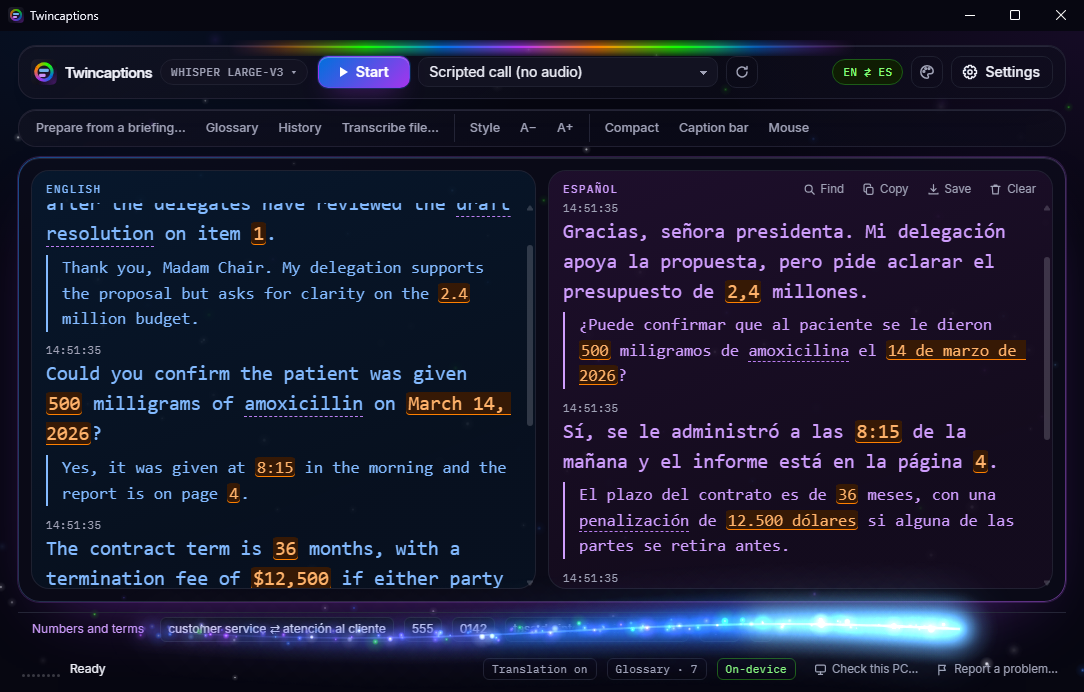
Read the recognized speech alongside its translation. Keep context in view with separate panes or a combined feed.
Illustrative caption exampleAudio recognition and translation run locally. Model downloads and purchase or licensing services need a connection.
Highlight figures and glossary terms so they're easier to find. Always confirm important details with the speaker.
Adjust type, colors, and layout. Prepare a glossary and revisit your history when saving is enabled.
Choose a supported Windows audio source, including audio from a selected application where available.
FROM SETUP TO CONVERSATION
Install the Windows app and download the models suited to your hardware.
Select the audio source you want to follow and configure your language pair.
Read the original and translation as the conversation unfolds. Pause or stop when you need to.
DESIGNED AROUND YOUR WORK
The same focused workspace, day or night. Readable type, clear panes, and controls within reach.
Real WebView captures with scripted test content.
YOUR LANGUAGES. YOUR MODELS.
The languages you can use depend on your recognition model and translation packs. Explore the coverage available in Twincaptions.
24 languages available with English as the main language
Choose English or Spanish as your main language. Some pairs need downloaded packs and may translate through English. Availability does not guarantee equal accuracy across languages.
Local CPU translation. English–Spanish is included; other languages need compatible packs. Available Cyrillic and Greek languages require Parakeet.
Translation is a separate local step, and every caption model works with every translator. Compact is included; Hy-MT2 and TranslateGemma are downloads in the app. Other languages may require additional language packs.
PROFESSIONAL TOOLS. APPROACHABLE PRICING.
Both plans include identical features and unlimited local translation.
Start small. Cancel anytime.
Your version. Yours to keep.
1-day free trial. No credit card required.
Moving from monthly to lifetime? Your first paid month earns a $3.99 credit, subject to payment verification.
Prices in USD. Applicable taxes and the total will be shown before payment.Need licenses for several PCs? See business options →FOR TEAMS AND ORGANIZATIONS
Interpreting agencies, schools, nonprofits and companies can set up Twincaptions on several PCs. Email us and you deal directly with the developer.
Each license key activates one PC. For 5, 50 or more PCs, ask about volume pricing for monthly or lifetime licenses.
One Windows installer for every computer. The app checks each PC’s hardware and offers the models it can run. There is no server to set up.
Speech recognition and translation run on each computer. Conversation audio is not sent to an online translation service.
In your email, tell us how many PCs you need, which languages you work with, and when you would like to start.
Email us about business licenses ↗Interpreters who want a live reference for numbers, names and terms (conference, remote, community, medical and legal interpreting), interpreting students, and professionals who take calls or meetings in two languages. It supports your work; it does not replace an interpreter.
The current app displays original and translated captions. It does not generate translated speech or replace a speaker's voice in a call.
Speech recognition and translation run on the PC. Setup, model downloads, and purchase, support, or licensing services may need internet. Conversation audio is not sent to a translation API.
Twincaptions does not join or connect to the meeting. It captions the audio your PC plays, from a Windows audio device or from one app such as your meeting app or browser, so it is not tied to one platform. Try it with your own call setup during the free trial.
It does not save audio recordings. Transcripts are saved only when you save one or turn on autosave (off by default), and they stay on your PC.
The app is for Windows. Parakeet provides CPU recognition; GPU models need a compatible NVIDIA GPU. Memory, storage, and speed depend on the models. Check the release-specific requirements before downloading.
The installer is new and not code-signed yet, so Edge, Chrome and Windows SmartScreen may say it isn’t commonly downloaded or comes from an unknown publisher. That is about the file being new, not a problem found in it. Download only from twincaptions.com and follow the step-by-step guide with pictures.
The current release includes Parakeet on the processor (24 app-supported spoken languages with English as main). In the app you can download Whisper Base, Small or Medium for the processor, or Whisper large-v3 (33 languages), Turbo, Medium or Small for a compatible NVIDIA graphics card. Translation pairs also need installed language packs.
Both include the same features. Monthly costs $3.99 and renews until cancelled, with updates while subscribed. The $24.99 lifetime license gives permanent access to the purchased major version, with bug fixes and security updates. Future major upgrades may be sold separately.
Try Twincaptions for 1 day without a credit card. Choose monthly or lifetime access to continue after your trial.
AI can omit or change words, numbers, and meaning. Twincaptions helps you follow a conversation. Confirm important information and use appropriate human review in high-stakes situations.
Built by an independent developer. Designed for real work.